

The Best Outdoor Office Setup for 2026: 5 Tools That Actually Hold Up
Getting the best outdoor office setup for 2026 right means solving three problems at the same time: power, display visibility, and device stability. Most outdoor sessions fail because remote workers patch one and ignore the other two. The pattern is familiar: decent laptop, phone propped against something, screen washed out by 9 a.m., and a battery gone before the first call ends. These five tools address all three as a system, covering input, display, power storage, solar charging, and device positioning in one connected workflow.
1. Satechi SM1 Slim Mechanical Keyboard — Compact Typing That Travels Without Apology

The Logic:
The 75% layout cuts the numpad and shrinks the function row, so if those matter to your workflow, there’s a real adjustment period. That said, the Low Profile MX Browns deliver a genuine tactile bump without the flat, mushy response most slim travel keyboards compromise toward. Bluetooth 5.0 connects to two devices simultaneously, so switching between a laptop and a tablet mid-session doesn’t require re-pairing anything. Get this if portability and Mac compatibility top your list; skip it if you rely on a numpad or strongly prefer linear switches.
The Build:
- Layout: 75% compact, 84 keys, Mac/Windows compatible
- Switches: Low Profile MX Brown (tactile, light bump that registers cleanly without audible click noise in quiet outdoor spaces)
- Weight: 471g (about the weight of a hardcover novel; light enough you won’t notice it until you unpack it)
- Battery: Up to 16.5 hours with backlight on (enough for a full outdoor workday without hunting for an outlet); up to 2 months with backlight off (charge before a trip and forget about it)
- Connectivity: Bluetooth 5.0 (2 devices), 2.4GHz USB-C receiver (1 device), wired USB-C
Every outdoor session that ends early because the keyboard feels wrong is a session you’ll just do inside next time.
Check availability on the Satechi SM1 Slim Mechanical Keyboard
2. XREAL One Pro AR Glasses — The AR Glasses That Turn Outdoor Glare Into a Non-Issue

The Logic:
Glare ends most outdoor work sessions before noon, and the XREAL One Pro addresses it by putting the screen somewhere sunlight can’t reach it. The Sony micro-OLED panels run at up to 5,000 nits peak, which holds readable contrast where a laptop screen would wash out completely. These glasses tether to your device’s USB-C port and only work if that port supports DisplayPort Alt Mode (video output, not just power). That rules out most budget Android phones and anything USB-A, but for anyone carrying a MacBook or an iPhone 15 and up, it’s a non-issue.
(The price is premium, no question. But a shade-independent, 171-inch display that folds into a glasses case doesn’t have many alternatives at any price point.)
The Build:
- Display: Dual Sony micro-OLED, 1920×1080 per eye (each pixel self-illuminates, so there’s no backlight washout in bright conditions); ultra-wide mode expands to 3840×1080 (the visual equivalent of two full monitors side by side)
- Simulated screen size: 171 inches at 4 meters (the perceived scale of a large conference room display, from your own seat)
- Peak brightness: 5,000 nits (roughly ten times a typical laptop display; holds readable contrast in direct sunlight where LCD screens give up)
- Refresh rate: 120Hz (matches most laptop displays; no perceptible stutter during calls or scrolling)
- Weight: 87g (lighter than most metal-frame sunglasses)
If you’ve given up on working outside by 10 a.m., this is the one piece of the stack that changes the math on it.
Check availability on the XREAL One Pro AR Glasses
Building out an indoor deep-work setup alongside this outdoor kit? The Focus Stack covers the fixed-desk tools built for the same kind of deliberate work.
3. Anker SOLIX C300 Portable Power Station — The Portable Power Station Built for Daily Carry

The Logic:
Most portable power stations live in a garage and come out for camping trips. The C300 packs 288Wh into 2.8kg, about the weight of a loaded 15-inch laptop, which makes daily carry realistic. The XT60 solar port (different from Goal Zero’s 8mm standard) means these two run in parallel in this kit, not in series. Get it if you’ll carry it outside regularly; skip it if outdoor sessions are occasional and a USB-C wall charger covers your laptop.
The Build:
- Capacity: 288Wh (roughly 3–4 full laptop charges, or a full outdoor workday of laptop and phone use without an outlet)
- AC output: 300W continuous, 600W surge (handles a laptop, monitor, and phone charger running at the same time)
- USB-C: 140W two-way fast charging (charges the station from a wall outlet while outputting at full laptop-charging speed simultaneously)
- Recharge: ~80% in 50 minutes from a wall outlet (fast enough to top off during a lunch break before an afternoon session)
- Battery tech: LiFePO4, rated 3,000-plus cycles to 80% capacity (roughly 8 years of daily use before noticeable degradation, vs. 500–1,000 cycles on standard lithium)
Losing power mid-call outside isn’t just inconvenient; it’s usually the last time someone tries working outside for a while.
Check availability on the Anker SOLIX C300 Portable Power Station
4. CloudValley Magnetic Laptop Phone Holder — The Part of the Outdoor Setup Nobody Plans For
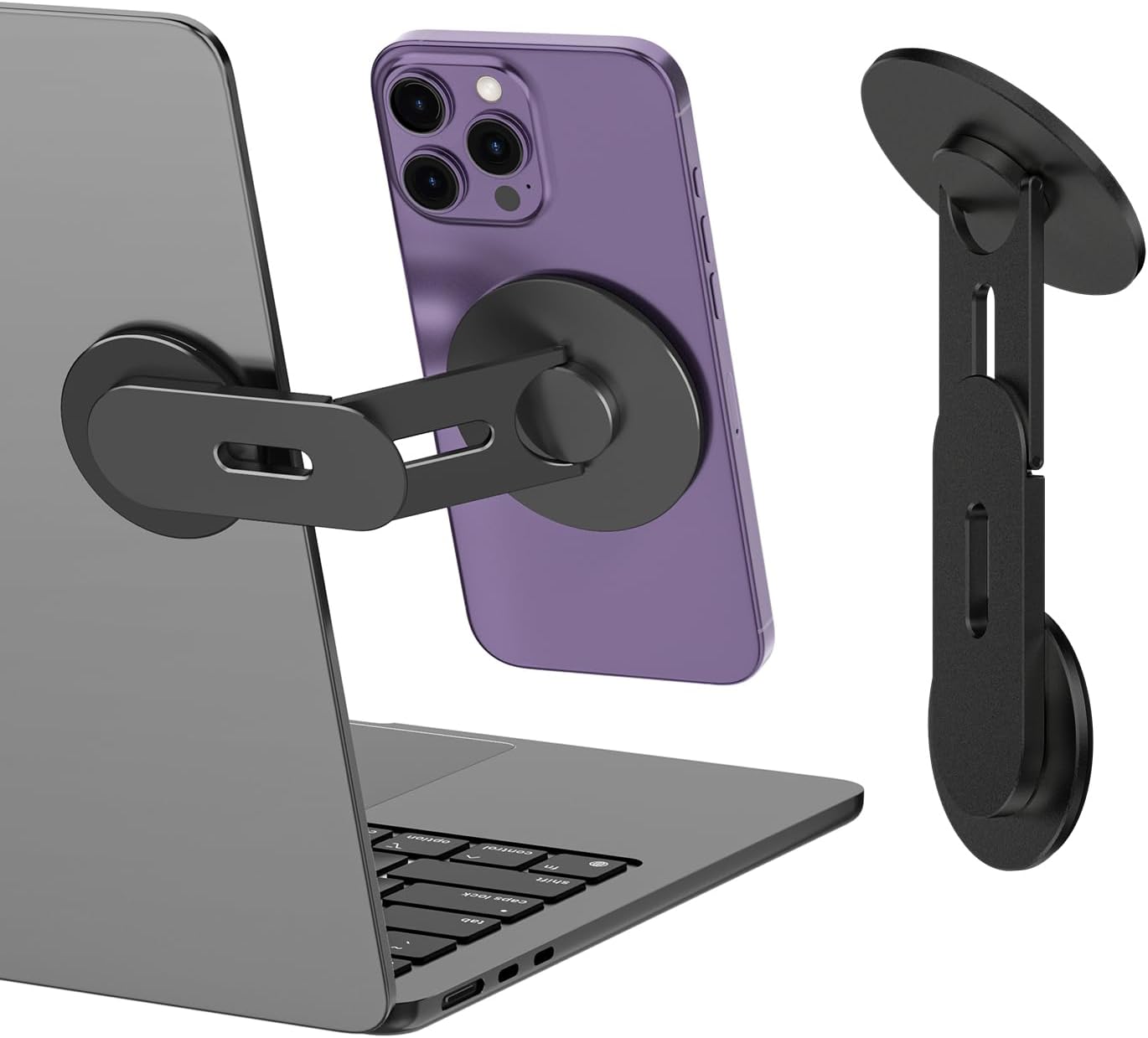
The Logic:
Most remote workers discover the phone-management problem when they try working outside and the phone ends up propped against a water bottle. This is a metal magnetic mount that clips to a laptop lid, holds a phone at a usable angle, and folds flat when you’re done. MagSafe iPhones attach without extra hardware; everything else uses the included ring adapter, though the adhesive base only grips smooth laptop lids reliably. Skip it if your lid has a coarse or rubberized texture; get it for everything else.
The Build:
- Compatibility: MagSafe iPhones (12 and up, Apple’s magnetic snap-on mount standard) native; all other phones with included metal ring adapter
- Rotation: 360° at the base; two metal pivot points in the arm hold angle under the weight of a phone without drooping
- Surfaces: Adhesive-mounts to laptop lids, monitors, flat screens, and Tesla displays
- Build: Metal body throughout (no plastic flex points in the arm at any adjustment position)
- Packed size: Folds flat and stores in a laptop sleeve side pocket without adding bulk
Attaching a phone mount takes 30 seconds, and it’s the difference between a real dual-screen workflow and your phone face-down on the table.
Check availability on the CloudValley Magnetic Laptop Phone Holder
5. Goal Zero Nomad 20 Solar Panel — 20 Watts of Grid Independence That Packs to Paperback Size

The Logic:
Twenty watts won’t rescue a laptop from a dead battery, and that’s not the job. A solar panel’s role here is keeping phones, earbuds, and a Bluetooth keyboard topped off so the power station’s charge stays reserved for the laptop. The Nomad 20 handles that via USB, though the 8mm Goal Zero connector won’t plug into the Anker C300’s XT60 solar input directly. Get this if longer outdoor sessions mean small-device battery drain is a real concern; skip it if you’re rarely outside more than three hours.
The Build:
- Output: 20W peak; 5V/2.1A USB port (enough to keep a phone charging continuously in direct sun) + 8mm Solar Port for compatible Goal Zero power packs
- Folded: 11.5 × 7.4 × 1.25 in (fits in a standard laptop sleeve side pocket without stretching it)
- Unfolded: 11.5 × 21.75 × 0.75 in (roughly the footprint of a legal pad laid flat)
- Weight: 2.28 lbs / 1.03 kg (about the weight of a trade paperback)
- Cable: 6 ft (long enough to angle the panel toward direct sun while your devices stay in shade)
A solar panel you’ll actually pack is a small one that fits in the bag you’re already carrying. Still sorting out that bag? The Carry Upgrade covers the best options for commuters and remote workers who need one bag for all of it.
Check availability on the Goal Zero Nomad 20 Solar Panel
No. Start with the Anker SOLIX C300 if power is your primary problem. Add the XREAL One Pro if screen glare is the real bottleneck. The keyboard, phone mount, and solar panel round out the system for longer sessions; most people build toward the full stack over time rather than buying everything at once.
Not without an adapter. The Nomad 20 uses Goal Zero’s proprietary 8mm connector; the SOLIX C300’s solar input takes XT60. In this stack, the Nomad 20 is best used to charge USB devices directly (phones, earbuds, keyboard), keeping the C300’s stored capacity reserved for the laptop.
Both work. The 120Hz FHD display and open Bose-tuned speakers handle video calls without issue on a compatible device. The main thing worth noting is that people on the call may notice the glasses; it’s worth a brief heads-up in a meeting context, but it’s not an issue for solo work.
The Bottom Line
The best outdoor office setup for 2026 isn’t about buying premium gear. It’s about solving the right sequence of problems in the right order. Power dies first. Screens wash out second. Devices end up propped against whatever’s nearby third. These five tools address that sequence directly, and each one earns its place in the bag.
The Anker SOLIX C300 is the foundation. Without reliable stored power, nothing else in this lineup works at its best. The XREAL One Pro removes the glare problem entirely and turns outdoor spaces with no shade into viable workspaces. After that, the Satechi SM1 gives you a real typing surface without requiring a second bag. The CloudValley mount closes the dual-screen gap. For the final piece, the Goal Zero Nomad 20 extends the session by keeping the small devices charged without drawing down the C300.
Start with the power station. Everything else in this outdoor workspace tools stack layers on top of that one decision.
