This post includes affiliate links. When you buy through these links, Gear & Logic earns a commission at no extra cost to you. Our recommendations prioritize technical merit over commission rates. Full details in our affiliate disclosure.

gray laptop on the table

The Best Outdoor Office Setup for 2026: 5 Tools That Actually Hold Up

Getting the best outdoor office setup for 2026 right means solving three problems at the same time: power, display visibility, and device stability. Most outdoor sessions fail because remote workers patch one and ignore the other two. The pattern is familiar: decent laptop, phone propped against something, screen washed out by 9 a.m., and a battery gone before the first call ends. These five tools address all three as a system, covering input, display, power storage, solar charging, and device positioning in one connected workflow.


1. Satechi SM1 Slim Mechanical Keyboard โ€” Compact Typing That Travels Without Apology

Satechi SM1 75% Mechanical Keyboard for Mac and Windows, LED Backlit Bluetooth Keyboard, 84 Keys Com...

$99.99
$99.99
  • Level Up Productivity โ€“ Connect up to 4 devices simultaneously with our wireless mechanical keyboard. Switch between them by holding FN + 1 or FN + 2 for Bluetooth, FN + 3 for USB receiver and, FN + 4 for wired mode
  • Customize Your Keyboard โ€“ The Satechi 75% mechanical keyboard has 84 keys with removable keyboard caps, and low-profile brown switches, combining smoothness and physical feedback. Making this keyboard a favorite choice for gamers and professionals
  • Ergonomic Design โ€“ Satechiโ€™s low-profile mechanical keyboard offers optimal low-light visibility with 14 customizable patterns. Adjust the three-brightness levels using F5 and F6, on and off with the light bulb key for 5 seconds. This rechargeable, and portable design features key stabilizers and adjustable feet for user efficiency. In cases of low battery, the spacebar backlit will flash, and switch off the backlit
  • Wide Compatibility โ€“ Our compact wireless keyboard is compatible with most type c devices like Mac, iPad, Windows, and Chromebooks. The keyboard comes with Windows keys such as โ€œWin, alt, altโ€ that can replace the Mac โ€œCMDโ€ and โ€œOptโ€ keys. Hold for 3 seconds โ€œFN + Oโ€ for Mac/iPadOS/iOS and โ€œFN + Pโ€ for PC
  • What You Get โ€“ With your purchase you will receive 2 Windows keycaps, 2 Alt Keycaps (left and right), a usb-c to usb-c cable (1.2m/ 3.2ft), a 2.4GHz USB receiver (attached to the bottom of the keyboard), and a user manual for your convenience. Satechi products are covered by a 2-year limited warranty against defects in materials and workmanship under normal use

The Logic:

The 75% layout cuts the numpad and shrinks the function row, so if those matter to your workflow, there’s a real adjustment period. That said, the Low Profile MX Browns deliver a genuine tactile bump without the flat, mushy response most slim travel keyboards compromise toward. Bluetooth 5.0 connects to two devices simultaneously, so switching between a laptop and a tablet mid-session doesn’t require re-pairing anything. Get this if portability and Mac compatibility top your list; skip it if you rely on a numpad or strongly prefer linear switches.

The Build:

  • Layout: 75% compact, 84 keys, Mac/Windows compatible
  • Switches: Low Profile MX Brown (tactile, light bump that registers cleanly without audible click noise in quiet outdoor spaces)
  • Weight: 471g (about the weight of a hardcover novel; light enough you won’t notice it until you unpack it)
  • Battery: Up to 16.5 hours with backlight on (enough for a full outdoor workday without hunting for an outlet); up to 2 months with backlight off (charge before a trip and forget about it)
  • Connectivity: Bluetooth 5.0 (2 devices), 2.4GHz USB-C receiver (1 device), wired USB-C

Every outdoor session that ends early because the keyboard feels wrong is a session you’ll just do inside next time.

Check availability on the Satechi SM1 Slim Mechanical Keyboard


2. XREAL One Pro AR Glasses โ€” The AR Glasses That Turn Outdoor Glare Into a Non-Issue

XREAL One Pro AR Glasses with X1 Chip, Native 3 DoF, X-Prism Optics, Real 3D, 57ยฐFOV 171" 120Hz FHD ...

$599.00
$599.00
  • XREAL’s Self-Developed X1 Spatial Computing Chip: Delivers Native 3DoF tracking with ultra-low 3ms M2P latency, ensuring stable visuals even during rapid movements. With the optional XREAL Eye, full 6DoF spatial anchoring. It delivers high processing power, seamless compatibility with devices, and distortion-free visuals through advanced stabilization.
  • The New Optic Engine-X-Prism Optics: XREALโ€™s advanced lens and projection systemโ€”ultra-slim, precision-engineered optics that project a large, sharp virtual screen right in front of your eyes, while still letting you see your real surroundings clearly. With a best-in-class 57ยฐ FOV, Optic Engine 4.0 recreates the feeling of watching a massive 171-inch screen from four meters awayโ€”all in lightweight, compact design. Its advanced anti-glare design minimizes reflections and light interference, enhancing clarity and immersion.
  • Experience True AR with 6 DoF, Spatial Anchor Anytime: Pairing with XREAL Eye, anchor your screen anywhere in your room, so it stays perfectly fixed in placeโ€”even as you walk around, lean in, or change your position. Unlike 3DoF, which keeps the screen at a constant distance relative to your head movements, 6DoF keeps your virtual screen locked to a real spot in your space for true spatial freedom and a more natural, immersive AR experience.
  • REAL 3D โ€“ Turn everything you watch into an immersive 3D experience: REAL 3D Now Available on All One Series Glasses, instantly transforming all your contentโ€”from games and movies to apps and photosโ€”into true 3D with a single switch. Experience richer depth and lifelike visuals across everything you watch or play.
  • 57ยฐFOV, 171” Spatial Screen โ€“ More Immersive Visual Experience: Experience a virtual screen starting at 171 inches wide, filling your view with blockbuster visuals, thanks to XREALโ€™s advanced optics and industry-leading 57ยฐ FOV. Powered by Sonyโ€™s 0.55′ Micro-OLED display technology and a smooth 120Hz refresh rate, get swept into your games or movies with immersion that rivals traditional home theatersโ€”without the size, setup, or space concerns.
  • Dual IPD Design โ€“ Made to Fit Everyone: The XREAL One Pro is designed for comfort and clarity, offering two size optionsโ€”M (57โ€“66mm IPD) and L (66โ€“75mm IPD)โ€”to fit over 95% of users. Three-stage adjustable arms, zero-pressure nose pads available in three sizes, and a new spring hinge design adapt easily to different head shapes and sizes, ensuring a secure fit without any pinching or pressure. Additionally, with built-in IPD adjustment software, youโ€™ll enjoy consistently clear, crisp visuals with minimal blurring or edge cut-off.
  • AR on Any Device, Anytime, Seamlessly: XREAL One Pro are compatible with any USB-C device capable of video output including iPhone 16/15, Android phones (supports DP output), Steam Deck, ROG Ally, MacBook, Windows PCs, and more. And paired with XREAL Eye, you can capture photos and videos instantly. An additional Beam or Adapter may be required for HDMI output devices including iPhone 14 and earlier models.
  • Audiovisual Mastery โ€“ Sound by Bose: XREAL One is fitted with a unique sound chamber design with new acoustic components, professionally tuned by Bose engineers. Enjoy high-quality audio without the need for additional headphonesโ€”whether youโ€™re gaming, watching movies, or on a call.
  • Bright Sunlight? No Problem. Always See Clearly โ€“ Indoors, Outdoors, Anytime: With up to 700 nits of brightness, XREAL One Proโ€™s display stays crisp and easy to see indoors or under bright sunlight. Advanced electrochromic dimming lets you instantly adjust the lens tint, so you can stay aware of your surroundings or block out distractions for total immersionโ€”putting you in control of your viewing experience in any environment.
  • Quick & Easy Settings Adjustments for Every Activity: Whether youโ€™re switching from gaming to email or jumping from a movie to a meeting, quick one-tap controls on the XREAL One Pro let you instantly adjust brightness, display mode, screen size or distanceโ€”right from the glasses. Customizable shortcuts keep your most-used settings at your fingertips, so your AR environment can adapt seamlessly to whatever youโ€™re doing next.

The Logic:

Glare ends most outdoor work sessions before noon, and the XREAL One Pro addresses it by putting the screen somewhere sunlight can’t reach it. The Sony micro-OLED panels run at up to 5,000 nits peak, which holds readable contrast where a laptop screen would wash out completely. These glasses tether to your device’s USB-C port and only work if that port supports DisplayPort Alt Mode (video output, not just power). That rules out most budget Android phones and anything USB-A, but for anyone carrying a MacBook or an iPhone 15 and up, it’s a non-issue.

(The price is premium, no question. But a shade-independent, 171-inch display that folds into a glasses case doesn’t have many alternatives at any price point.)

The Build:

  • Display: Dual Sony micro-OLED, 1920ร—1080 per eye (each pixel self-illuminates, so there’s no backlight washout in bright conditions); ultra-wide mode expands to 3840ร—1080 (the visual equivalent of two full monitors side by side)
  • Simulated screen size: 171 inches at 4 meters (the perceived scale of a large conference room display, from your own seat)
  • Peak brightness: 5,000 nits (roughly ten times a typical laptop display; holds readable contrast in direct sunlight where LCD screens give up)
  • Refresh rate: 120Hz (matches most laptop displays; no perceptible stutter during calls or scrolling)
  • Weight: 87g (lighter than most metal-frame sunglasses)

If you’ve given up on working outside by 10 a.m., this is the one piece of the stack that changes the math on it.

Check availability on the XREAL One Pro AR Glasses

Building out an indoor deep-work setup alongside this outdoor kit? The Focus Stack covers the fixed-desk tools built for the same kind of deliberate work.


3. Anker SOLIX C300 Portable Power Station โ€” The Portable Power Station Built for Daily Carry

Anker Portable Power Station SOLIX C300, 288Wh LiFePO4 Battery, 300W (600W Surge) Solar Generator, 1...

$249.99
$249.99
  • Compact with Massive Power: It’s portable power that moves as freely as you. Give your devices 300W (600W Surge) and 288Wh. Fast charge with 140W two-way USB-C ports.
  • 8 Versatile Charging Ports: Keep your essential devices powered (e.g., laptops, phones, cameras, drones) with 3x AC outlets (300W total), 1x car socket (120W), 2x USB-C (140W each), 1x USB-C (15W), and 1x USB-A (12W).
  • Travel-Friendly Design: Attach the strap(sold separately) or simply carry this power station. It’s 15% smaller than similar designs and perfect for spontaneous adventures.
  • Solar-Powered Escapes: When your journey needs endless charging, do so seamlessly and sustainably with a 100W solar panel. We recommend 100W or 60W Anker Solar Panel. This power station is not compatible with Anker SOLIX PS30 (or other 5V~3A USB-C panels), PS200, PS400.
  • Your Choice of Recharging: Recharge to 80% in just 50 minutes with a wall outlet, or use solar panels, your car, or the PD 3.1 USB-C port. Stay charged, no matter where you are.
  • 10 Years of Power: Built to last a decade, power up with LiFePO4 batteries, designed to last 3,000 cycles. Also enjoy smart temperature control, impact resistance, and a 5-year warranty.
  • Quiet 25dB Power: Rest while you power in nature. This power station only emits 25dB from 3.3 ft away.
  • What is in the Box: Anker SOLIX C300 Portable Power Station, AC Charging Cable, Safety Manual, and Warranty Info

The Logic:

Most portable power stations live in a garage and come out for camping trips. The C300 packs 288Wh into 2.8kg, about the weight of a loaded 15-inch laptop, which makes daily carry realistic. The XT60 solar port (different from Goal Zero’s 8mm standard) means these two run in parallel in this kit, not in series. Get it if you’ll carry it outside regularly; skip it if outdoor sessions are occasional and a USB-C wall charger covers your laptop.

The Build:

  • Capacity: 288Wh (roughly 3โ€“4 full laptop charges, or a full outdoor workday of laptop and phone use without an outlet)
  • AC output: 300W continuous, 600W surge (handles a laptop, monitor, and phone charger running at the same time)
  • USB-C: 140W two-way fast charging (charges the station from a wall outlet while outputting at full laptop-charging speed simultaneously)
  • Recharge: ~80% in 50 minutes from a wall outlet (fast enough to top off during a lunch break before an afternoon session)
  • Battery tech: LiFePO4, rated 3,000-plus cycles to 80% capacity (roughly 8 years of daily use before noticeable degradation, vs. 500โ€“1,000 cycles on standard lithium)

Losing power mid-call outside isn’t just inconvenient; it’s usually the last time someone tries working outside for a while.

Check availability on the Anker SOLIX C300 Portable Power Station


4. CloudValley Magnetic Laptop Phone Holder โ€” The Part of the Outdoor Setup Nobody Plans For
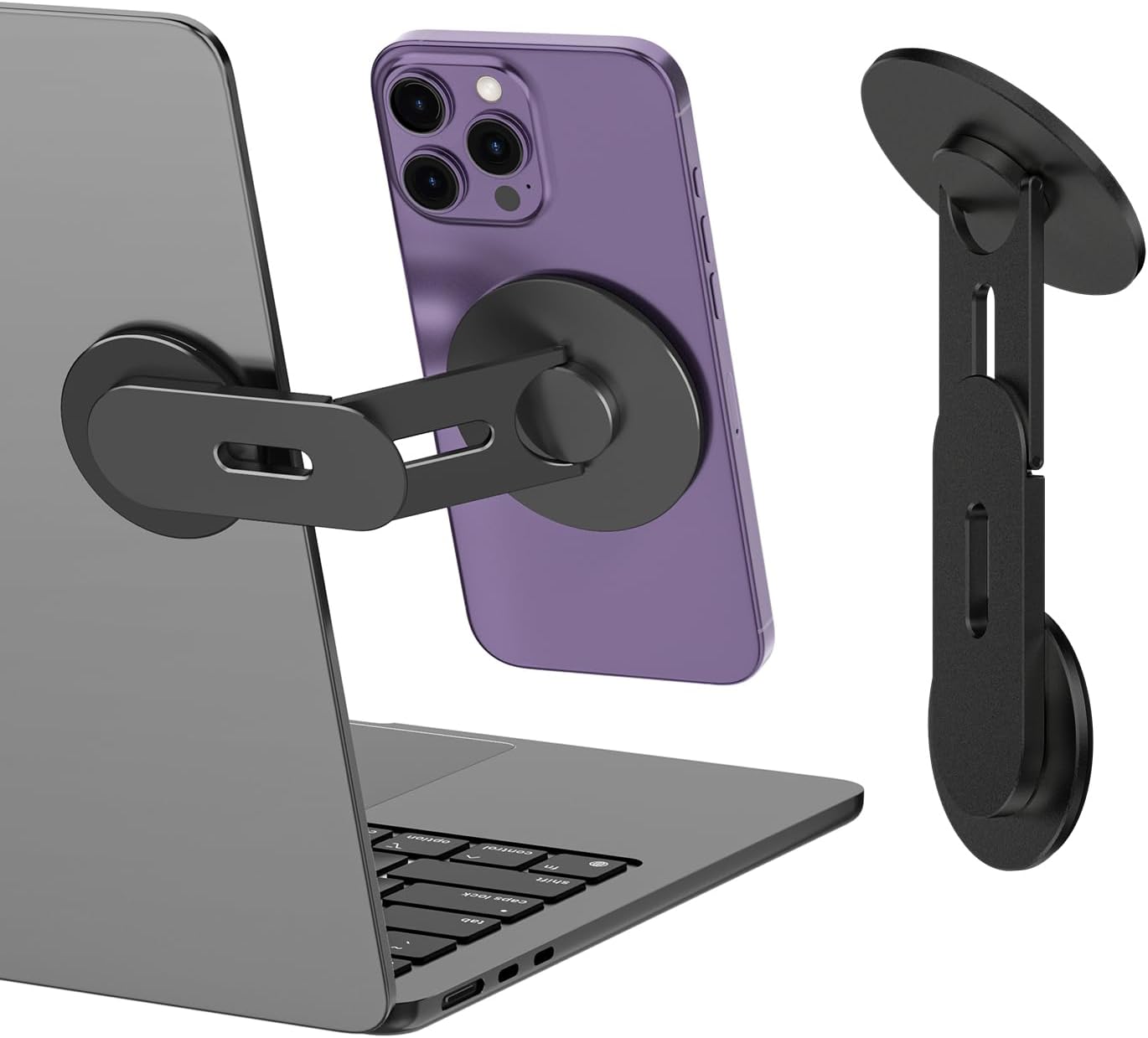
CloudValley Magnetic Laptop Phone Holder, 360ยฐ Rotating Mount Compatible with iPhone MagSafe and All...

$17.99
$17.99
  • ใ€Upgraded Adjustable Magnetic Cell Phone Holderใ€‘This new upgraded adjustable magnetic cell phone stand can firmly attach your cell phone to your laptop, desktop monitor, Tesla computer monitor and other devices. Easily view text messages, answer calls, enjoy dual-screen interaction and improve work efficiency
  • ใ€Compatible with all cell phonesใ€‘Specially designed for iPhone 17/16/15/14/13/12 series and other cell phones with metal rings (supports MagSafe and non-MagSafe phones). This product is not only suitable for laptops and monitors, but also for Tesla Model 3/X/Y/S car use. And with a magnetic ring, it supports all Android phones and other devices
  • ใ€Easy to useใ€‘Adsorb the phone before installation and reserve enough space for use. Remove the protective tape from the mounting base, attach it to the back of a desktop or laptop monitor, and rotate the stand arm to reveal the magnetic stand. The phone can be firmly attached to the laptop or monitor without loosening
  • ใ€Lightweight and Portableใ€‘This magnetic phone holder is made of lightweight aluminum alloy, compact, space-saving and easy to carry. Whether you are on a business trip, meeting, or traveling, business occasions, it is the ideal choice for you to enhance your work efficiency anytime and anywhere
  • ใ€What You Getใ€‘1 x Laptop side expansion bracket phone stand, 2 x Metal plates, If you have any questions during use, please feel free to contact us! Tips:Please wait at least 6 hours before use.

The Logic:

Most remote workers discover the phone-management problem when they try working outside and the phone ends up propped against a water bottle. This is a metal magnetic mount that clips to a laptop lid, holds a phone at a usable angle, and folds flat when you’re done. MagSafe iPhones attach without extra hardware; everything else uses the included ring adapter, though the adhesive base only grips smooth laptop lids reliably. Skip it if your lid has a coarse or rubberized texture; get it for everything else.

The Build:

  • Compatibility: MagSafe iPhones (12 and up, Apple’s magnetic snap-on mount standard) native; all other phones with included metal ring adapter
  • Rotation: 360ยฐ at the base; two metal pivot points in the arm hold angle under the weight of a phone without drooping
  • Surfaces: Adhesive-mounts to laptop lids, monitors, flat screens, and Tesla displays
  • Build: Metal body throughout (no plastic flex points in the arm at any adjustment position)
  • Packed size: Folds flat and stores in a laptop sleeve side pocket without adding bulk

Attaching a phone mount takes 30 seconds, and it’s the difference between a real dual-screen workflow and your phone face-down on the table.

Check availability on the CloudValley Magnetic Laptop Phone Holder


5. Goal Zero Nomad 20 Solar Panel โ€” 20 Watts of Grid Independence That Packs to Paperback Size

Goal Zero Nomad 20, Foldable Monocrystalline 20 Watt Solar Panel with 8mm + USB Port, Portable Solar...

$0.00
$0.00
  • HIGH EFFICIENCY PANEL: The 20W, 18-22V Panel has a built in 8mm charging cable and a USB port
  • LIGHTWEIGHT: Weighs 2.25 lbs, Fits most places at 11.5×21.75x.75″(unfolded), 11.5×7.4×1.25″(folded)
  • VERSATILE: Hook it on your backpack while hiking, or prop it up with the 180ยฐ adjustable kickstand
  • USA ENGINEERED: Developed by a US-based team combing over 50 years of experience with Solar Energy
  • WARRANTY: 1 year manufacturer warranty. Our US based support team is available to make it right

The Logic:

Twenty watts won’t rescue a laptop from a dead battery, and that’s not the job. A solar panel’s role here is keeping phones, earbuds, and a Bluetooth keyboard topped off so the power station’s charge stays reserved for the laptop. The Nomad 20 handles that via USB, though the 8mm Goal Zero connector won’t plug into the Anker C300’s XT60 solar input directly. Get this if longer outdoor sessions mean small-device battery drain is a real concern; skip it if you’re rarely outside more than three hours.

The Build:

  • Output: 20W peak; 5V/2.1A USB port (enough to keep a phone charging continuously in direct sun) + 8mm Solar Port for compatible Goal Zero power packs
  • Folded: 11.5 ร— 7.4 ร— 1.25 in (fits in a standard laptop sleeve side pocket without stretching it)
  • Unfolded: 11.5 ร— 21.75 ร— 0.75 in (roughly the footprint of a legal pad laid flat)
  • Weight: 2.28 lbs / 1.03 kg (about the weight of a trade paperback)
  • Cable: 6 ft (long enough to angle the panel toward direct sun while your devices stay in shade)

A solar panel you’ll actually pack is a small one that fits in the bag you’re already carrying. Still sorting out that bag? The Carry Upgrade covers the best options for commuters and remote workers who need one bag for all of it.

Check availability on the Goal Zero Nomad 20 Solar Panel


No. Start with the Anker SOLIX C300 if power is your primary problem. Add the XREAL One Pro if screen glare is the real bottleneck. The keyboard, phone mount, and solar panel round out the system for longer sessions; most people build toward the full stack over time rather than buying everything at once.

Not without an adapter. The Nomad 20 uses Goal Zero’s proprietary 8mm connector; the SOLIX C300’s solar input takes XT60. In this stack, the Nomad 20 is best used to charge USB devices directly (phones, earbuds, keyboard), keeping the C300’s stored capacity reserved for the laptop.

Both work. The 120Hz FHD display and open Bose-tuned speakers handle video calls without issue on a compatible device. The main thing worth noting is that people on the call may notice the glasses; it’s worth a brief heads-up in a meeting context, but it’s not an issue for solo work.


The Bottom Line

The best outdoor office setup for 2026 isn’t about buying premium gear. It’s about solving the right sequence of problems in the right order. Power dies first. Screens wash out second. Devices end up propped against whatever’s nearby third. These five tools address that sequence directly, and each one earns its place in the bag.

The Anker SOLIX C300 is the foundation. Without reliable stored power, nothing else in this lineup works at its best. The XREAL One Pro removes the glare problem entirely and turns outdoor spaces with no shade into viable workspaces. After that, the Satechi SM1 gives you a real typing surface without requiring a second bag. The CloudValley mount closes the dual-screen gap. For the final piece, the Goal Zero Nomad 20 extends the session by keeping the small devices charged without drawing down the C300.

Start with the power station. Everything else in this outdoor workspace tools stack layers on top of that one decision.

Leave a Reply